


multicall

MultiCall for Business: A Tour

Once you login to your account using your domain email id, it takes you to the dashboard.

Overview

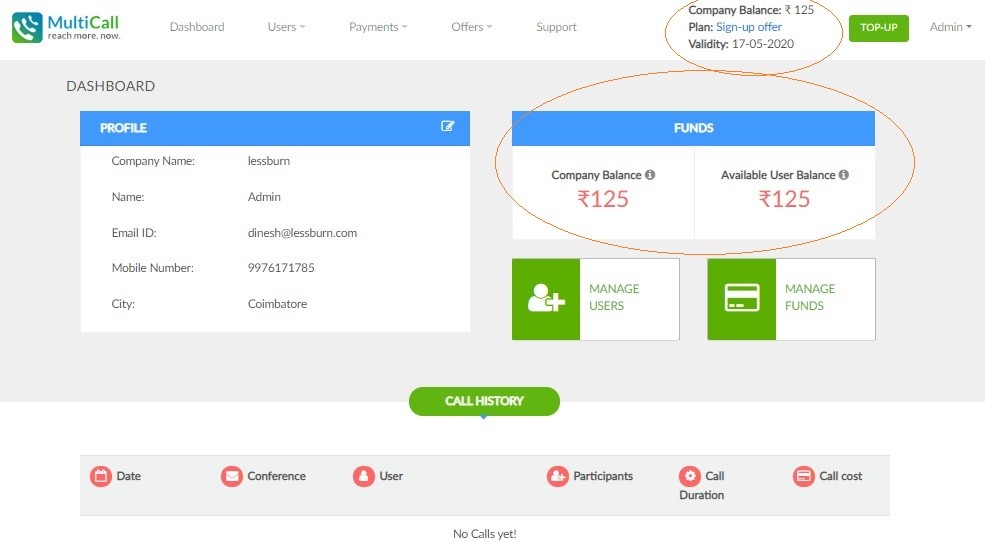
The dashboard is your information tool to check all details regarding your profile; with your essential details such as Company, Name, E-mail ID, Mobile Number and City displayed. Should you find an error in any of them, you can click on the ‘Modify’ icon, and will land on the page as below upon doing so

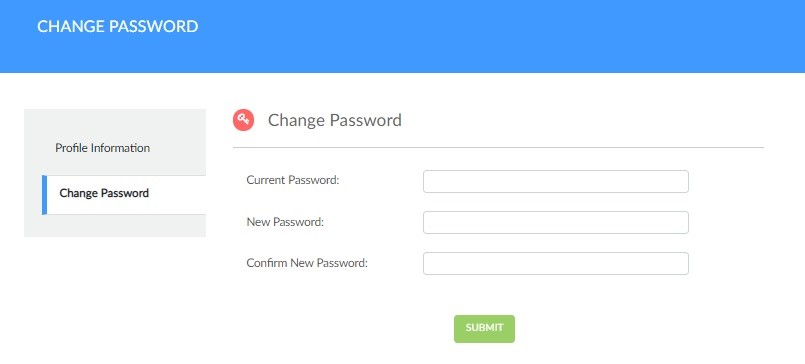
Change Password

You can also modify your account password as and when needed.

Change your passwords regularly, and do not reuse them!

Call Monitoring is an integral feature of MultiCall; all your MultiCalls are registered in the Call History section, where you can monitor completed calls, the duration, the number of participants, and the call cost involved. This is especially useful for businesses such as SMEs needing 100% control over spending, and therein need to scrutinize their usage.


Funds

With both prepaid and post-paid services offered for your consideration, it’ll be necessary to know what plan the company is currently using and its validity in order to ensure smooth operations. It also provides you the information on your existing funds…separated into company balance and the balance available to users.


Both funds and users are resources, and resources require proper allocation in order to be efficient and effective. Considering this, the ‘Manage Users’ button lets you add users, identifying them by Name, Email ID and Mobile Number, and also to mark whether the user is authorized to execute international MultiCalls.

Users

Besides the functions of Managing Users and Balance mentioned previously, the Users tab also allows you to view account usage history as well to maintain track of both the balance and the amount actually used.

Payments

The payments tab essentially is comprised of the following sub-sections:

Payment

Payment History

Plan My Plan


Contact Form


apple-store-app
google-play-app

YOU MAY ALSO LIKE

Why Do Financial Institutions Still Prefer Conference Calls for Sensitive Discussions?

Financial institutions operate in an environment where every conversation matters. Whether discussing investment strategies, regulatory updates, customer information, or internal business decisions, communication must be secure, reliable, and uninterrupted. While video conferencing platforms have become common for daily collaboration, many banks, financial firms, insurance companies, and investment organizations continue to rely on conference calls for sensitive discussions.

Read More »

How Can HR Teams Conduct Company-Wide Announcements Without Technical Issues?

Emergencies leave little room for delays. Whether it’s a system outage, a natural disaster, a cybersecurity incident, or an operational crisis, businesses must communicate quickly and clearly with employees, leadership teams, and key stakeholders. In these situations, the communication method itself can influence how effectively an organization responds.

Read More »

Is There a Better Alternative to Sharing Meeting Links for Business Calls?

Business meetings have evolved significantly over the years. While online meeting platforms have made remote collaboration easier, they have also introduced new challenges. Participants often struggle with expired meeting links, forgotten passwords, software downloads, and internet connectivity issues. These small obstacles can quickly turn into major productivity losses, especially when meetings involve clients, executives, or time-sensitive discussions.

Read More »

How Do Enterprises Keep Large Teams Connected During Network Disruptions?

Business operations don’t stop when the internet slows down or becomes unavailable. Organizations still need to coordinate with employees, update customers, make operational decisions, and respond to unexpected situations. During network disruptions, communication becomes even more important because delays can lead to missed opportunities, reduced productivity, and operational challenges.

Read More »

Can You Host a Secure Conference Call Without Downloading an App?

Businesses rely on conference calls to connect employees, clients, and stakeholders regardless of their location. However, many virtual meetings begin with familiar frustrations—downloading an application, creating an account, updating software, or troubleshooting technical issues. These delays can waste valuable time, especially when discussions are urgent.

Read More »




