multicall

6 Steps To Manage Your Weekly Review

Stop and Think. We often tend to forget this in the corporate scenario. Not stopping for a weekly review call can lead teams to lose track of tasks (completed or pending) and the performances relevant to them.

Lose sleep, and you build up a sleep debt. Similarly, miss a weekly review, and you build up its debt. It’s essential to treat this review call with as much importance as you would a sales or client meeting. And dedicating a review call each week to your progress only requires 6 steps to effectively manage them.

Set a clear day and time each week

Having a review call allows you to have an objective view on your week’s outputs, and even incentivizes you to be proactive with future tasks and their planning, in the manner above. Being objective, however, means having an aim.

 This accordingly means having a timeframe and a tool to enforce it with. One such tool to help you with this case is MultiCall, a group calling app dedicated to let you call many with the ease of calling one.

 MultiCall’s Call Scheduling assists in helping set up the meeting, not just in setting the date and time with the necessary team members, but in its ability to set the meeting to recur and auto-initiate the call as well.

 Clear your inbox

Our email service providers themselves try to sort mails into multiple inboxes, at different categories or levels of importance. Collaboration during remote working has presented itself as a WFH issue that makes our  inboxes open to virtually anyone, for putting another task onto our to-do list. How regular you clear your inboxes is entirely up to you, but the weekly review call is a perfect time to clean the slate.

 Have a “Waiting-For” list

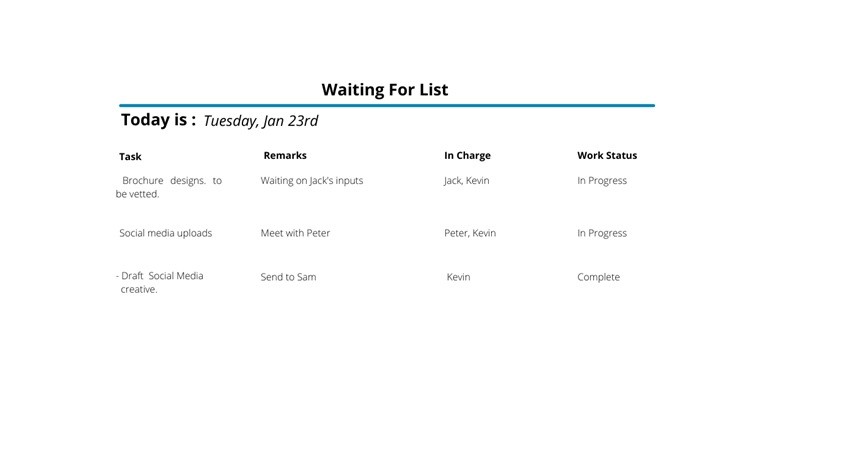
The time taken to accomplish tasks during teamwork is sometimes subject to someone else’s delivery of outputs. Having a managerial position means that there are a multitude of such tasks that you are waiting for. It’s therefore appropriate that you keep reminders of all the things that you are waiting on; to get back from or get done by others.

 Maintaining such a list would allow for a clear and prepared discussion, with active follow-up during the weekly review. One of the easiest ways to keep such a list is create an Excel or similar document to categorically list all tasks that are underway, with a column clearly allocated to who’s in charge of the task. The image above is an example of this.

 In order to be effective, this has to be accessible and editable by everyone in the weekly review calls.  Remember to update your waiting-for list on a regular basis!

Set high priority tasks for the upcoming week

Check and improve projects

As the adage goes, “what gets measured, gets managed”. Continuous improvement of process and productivity can be managed by regularly tracking your tasks during your weekly review.

As with digital marketing, where we constantly check our inputs’ performance by metrics like impressions and reach, it’s imperative to identify a relevant metric by which you want to measure your performance, and improve upon it subject to your goals.

This then can be compared and assessed during the weekly review call. You can use the above image as a reference! However, this doesn’t apply just to you, it applies to your team as well. Making sure that everyone has actively involved in the process is also critical to performance.

MultiCall’s Call Monitoring system helps here; not just in being able to monitor who is involved, but also to record and keep track of each review call.


Contact Form


apple-store-app
google-play-app

YOU MAY ALSO LIKE

HOW MULTICALL TRANSFORMS CROSS-DEPARTMENT COLLABORATION IN LARGE ENTERPRISES

Large enterprises are all about collaboration. Enter MultiCall’s voice communication system that effortlessly connects multiple departments via unlimited group calling and smart scheduling.
Video conferencing often makes interdepartmental meetings inaccessible for many teams. When departments can’t meet without lags or face login issues and other video call mishaps, communication bottlenecks happen.

Read More »

THE ROI OF RELIABLE COMMUNICATION – SAVING ENTERPRISES TIME AND MONEY

Efficiency equals profitability in business; central to that is communication. Countless organizations have miscalculated the cost of an unreliable phone or messaging application. Hours of delays, dropped calls, miscommunication, lost meetings, and disjointed coordination can translate into serious financial loss for an enterprise.

Communication has become less of an amenity and more of an investment. Enterprise voice communication software like MultiCall, with a complete solution for large teams, comes with a very clear and direct return on investment (ROI) through increased productivity, decreased downtimes, and operationally safeguarded communication.

Read More »

MULTICALL IN HEALTHCARE: FAST, PRIVATE AND RELIABLE TEAM COORDINATION

MultiCall’s Instant internet-free group calling with smart scheduling and call monitoring features ensures that hybrid workforces are truly connected

Hybrid is the new normal. Video meetings are draining, chat tools fragment discussions, and poor connections mean dropped calls. MultiCall helps close the gap between office and remote teams.

Read More »

MULTICALL FOR HYBRID WORKFORCES – BRIDGING OFFICE AND REMOTE TEAMS

MultiCall’s Instant internet-free group calling with smart scheduling and call monitoring features ensures that hybrid workforces are truly connected

Hybrid is the new normal. Video meetings are draining, chat tools fragment discussions, and poor connections mean dropped calls. MultiCall helps close the gap between office and remote teams.

Read More »